

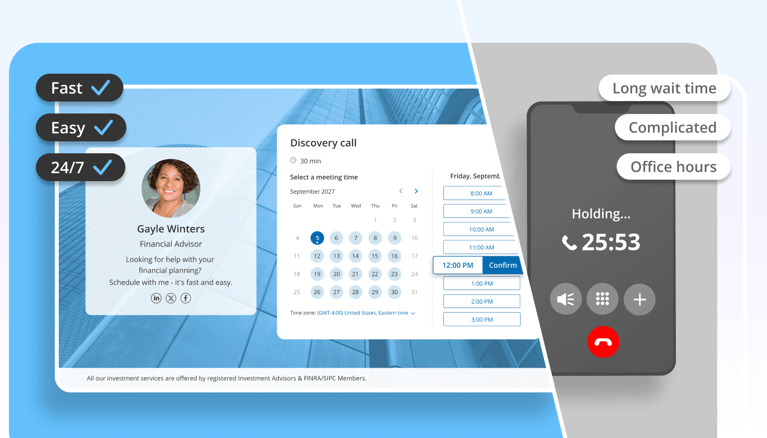
Getting customers to book online means setting up a branded booking page, sharing it across your communication channels, and using automated reminders to reduce no-shows. Online scheduling saves businesses an average of 5 hours per week while improving customer experience and conversion.
Inviting your customers to book online instead of calling can significantly enhance the efficiency of your operations and help grow your business.
As a matter of fact, according to research conducted by VMR in 2024, professionals have reported spending an average of almost 5 hours a week booking meetings, that's more than 10% of a 40-hour workweek. Just think how many tasks you could complete with that time freed up by online scheduling.
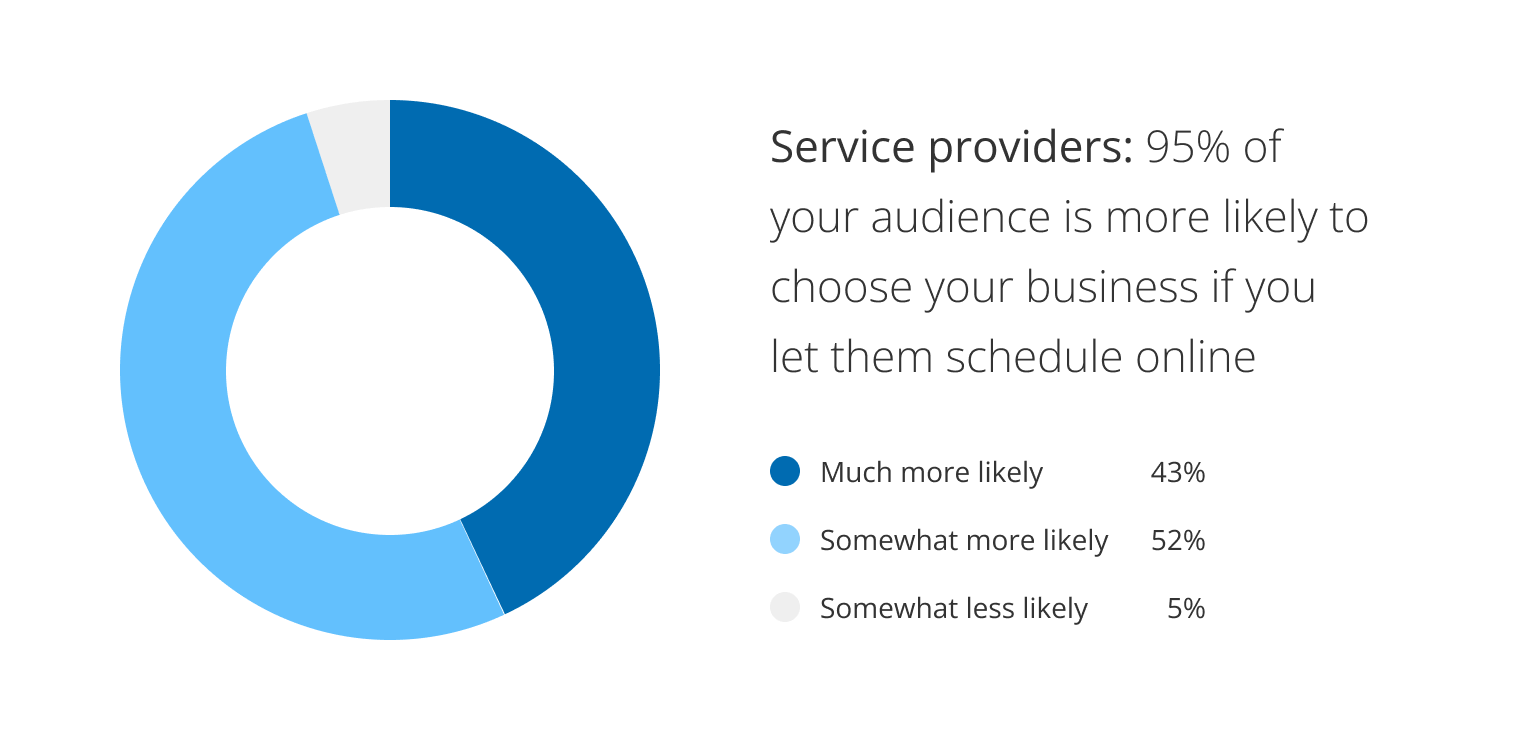
Additionally, a report released by GetApp in 2021 shows that 95% of participants say they would be more likely to choose a new service provider if it offered online booking options. Yes, 95%.
By adopting an online scheduling system, you can:
- Reduce the volume of phone calls and back-and-forth meeting coordination emails
- Minimize human error
- Free up staff time for other essential tasks
- Grow your customer base by reaching and communicating with more people
- Improve customer experience and strengthen your relationship with your clients
Follow these tips to transition to online scheduling successfully and give your audience the freedom to self-book. Get ready to enhance client satisfaction, reduce no-shows, and drive revenue growth.
Scheduling Options for the Modern Business
Before we delve into strategic tips, let's look at the scheduling solutions out there and how they can serve your company.
Scheduling Over the Phone
Booking via AI voice agents allows for direct interaction and immediate clarification of any questions or concerns. It helps you get to know your clientele on a more personal level while scheduling. It also enables you to address their needs and assess their urgency on the spot.
On the other hand, scheduling-related phone calls take time and energy — they often require hiring an office assistant to answer, screen, book, and direct calls. Phone bookings are also more likely to lead to errors and misunderstandings. Another problem is the waiting time and the limitations of your business hours. A study published by GetApp in 2021 reported that 59% of participants were frustrated with phone scheduling due to the time wasted waiting on hold and the inconvenient office hours.
This is where OnceHub's AI Phone Agent changes the math: it answers, qualifies, and books directly against your live calendar, so callers get the same real-time, personal interaction — without you needing to staff a phone line to provide it.
Scheduling Via Email
Unlike phone booking, email booking provides a written record of the appointment details and the preceding correspondence, which can reduce misunderstandings and help you prepare for the meeting. It also allows clients to book without getting stuck on hold or waiting for office hours.
On the other hand, since the communication isn't instant, booking an appointment can take a long time. This method may also lack the personal touch that some people prefer, and it requires manual handling of each booking request. It's also easy to lose track of email correspondence, which could lead to people feeling ignored or neglected.
OnceHub closes that gap: every booking still generates a written confirmation and reminder trail, but nobody's waiting on a reply to actually get a time on the calendar.
Scheduling Online
There are many advantages to scheduling appointments online, both for you and for your audience. It enables you to provide 24/7 access, reduces the likelihood of errors, frees up staff time for other tasks, and improves business efficiency. This is exactly what OnceHub's booking pages are built for — a live, branded page that reflects your real calendar, with no manual coordination required on your end.
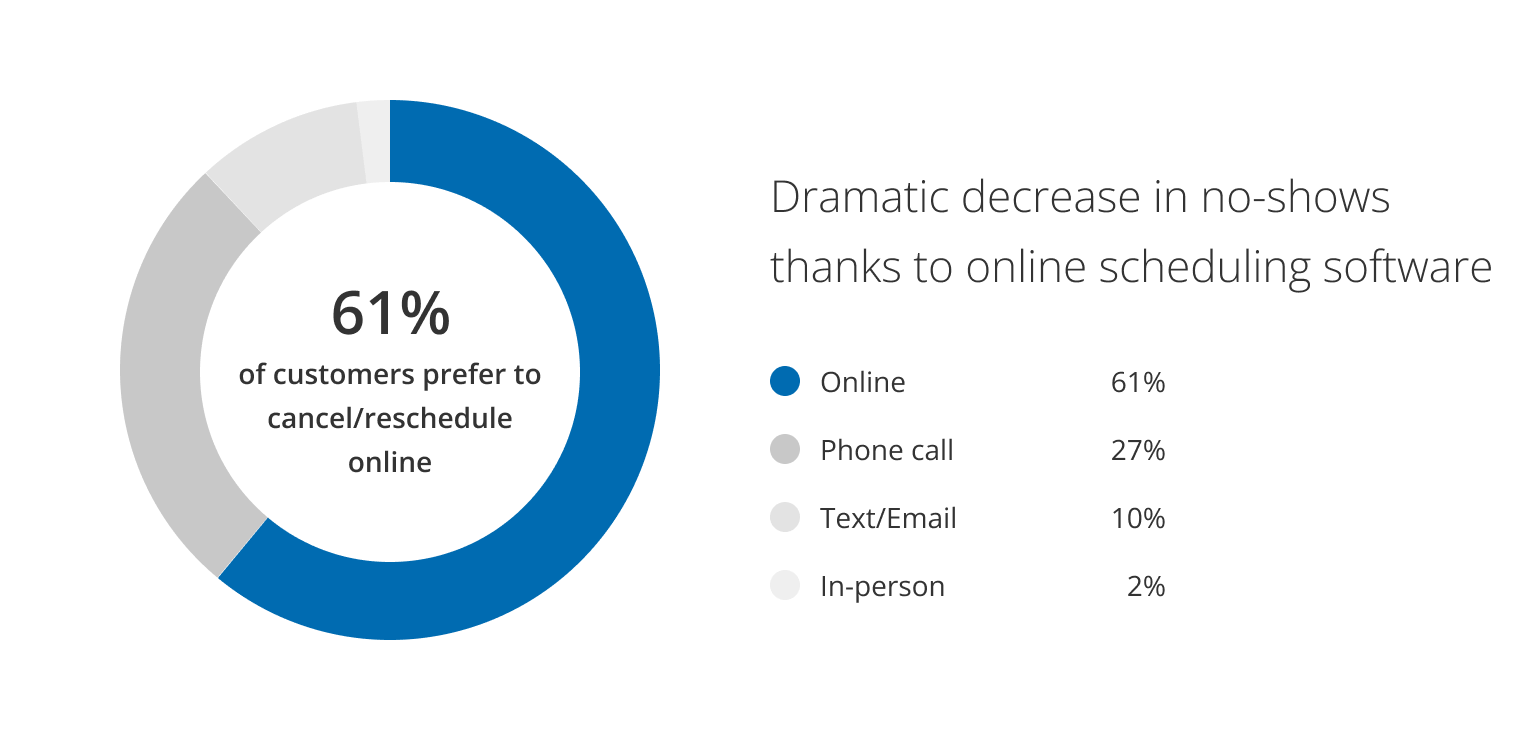
Fewer no-shows is another strong advantage of online scheduling. When asked how they prefer to cancel and reschedule meetings, 61% of customers answered online, 27% preferred phoning, and only 7% chose email as their preference (GetApp Report, 2021). Just think how many no-shows could be avoided if you had online scheduling capabilities, and how much time this could save.
On the downside, some may find online systems challenging to navigate. So when considering online scheduling, take your audience demographic into account, and make sure you choose a system that's people-friendly, intuitive, and accessible.
Ten Reasons to Switch to Online Scheduling
While keeping up with advances in one's industry and changing work processes is always challenging, it's important to stay relevant. The same goes for scheduling; we must keep up with our audience's expectations and preferred communication channels. And these days, one of those expectations is to be able to self-book anytime and anywhere.
According to VMR's Appointment Scheduling Software Market Valuation – 2024-2031, 68% of North American customers actively prefer businesses that offer online appointment scheduling. Platforms like OnceHub are built around exactly that expectation — a live, self-service booking page that works whenever your audience is ready, not just when your office is open.
Let's take a closer look at the advantages of online scheduling to understand why:
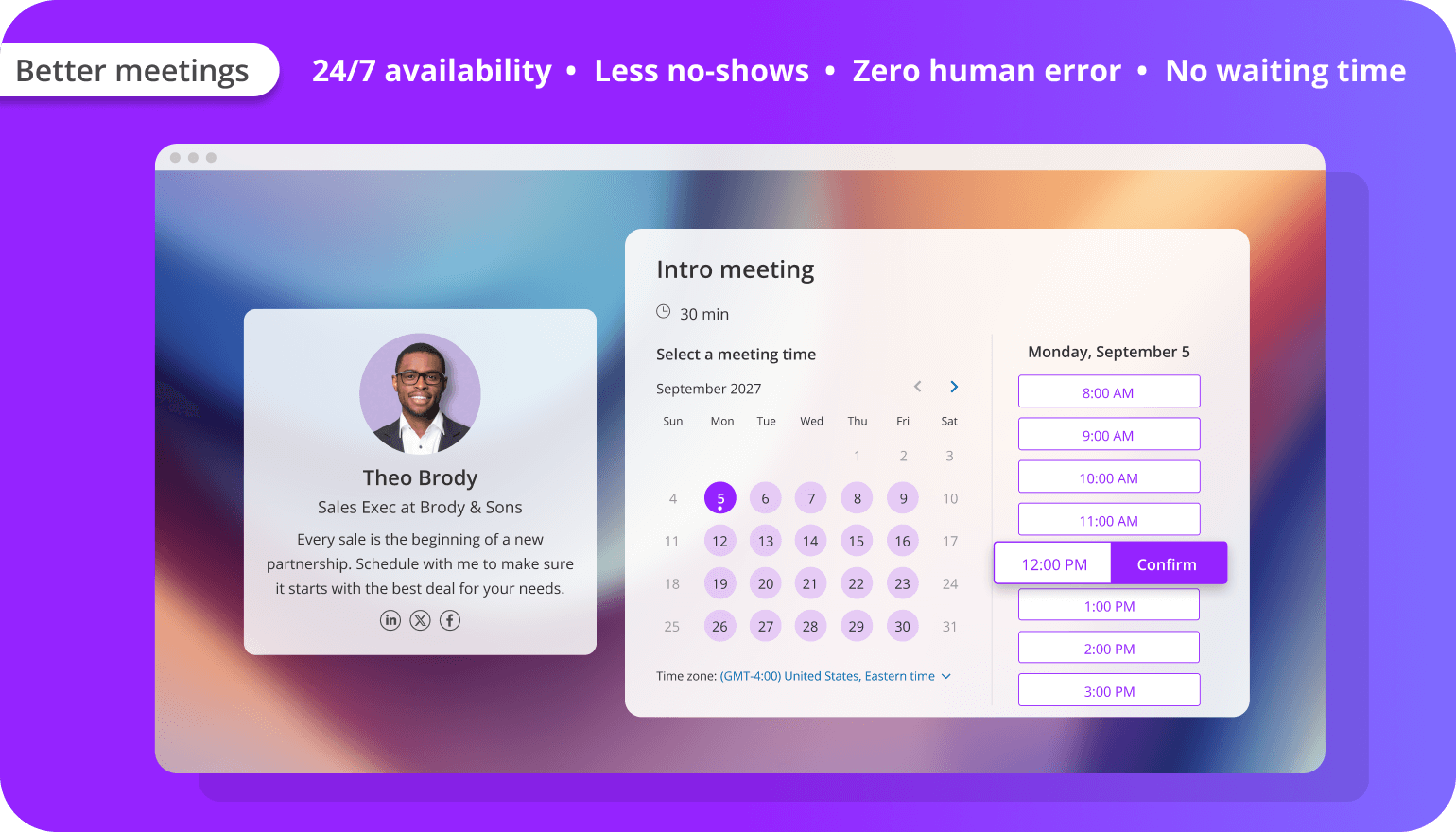
- 24/7 availability: Online scheduling allows your audience to self-book at their convenience, at any time, and from any device.
- No waiting time: With an online scheduling system, no one gets stuck on hold. Your clients don't need to wait for you to answer, and you don't have to wait for them to check their calendar.
- Fewer no-shows and cancellations: A booking experience that includes automated email confirmation, multi-channel reminders, and rescheduling options increases commitment and avoids last-minute cancellations.
-
Zero human error: An online scheduling system minimizes the risk of scheduling mistakes, ensuring accurate scheduling and customer satisfaction.
- Automated screening: Some online appointment scheduling tools allow you to add screening questions before sharing your availability, ensuring you don't schedule unnecessary meetings.
- Built-in data collection: Good scheduling software offers built-in analytics features that let you identify booking trends, monitor your team's meeting load, collect client data, and keep track of your meeting funnels.
- Brand positioning: A seamless, well-designed booking process reflects positively on your brand, instilling confidence in potential customers.
- Better conversion: By making it easier to schedule with you, you're showing that you're service-focused, increasing trust and boosting engagement — all vital for conversion.
- Additional marketing asset: Every online scheduling page can serve as an asset you use to reach your audience and interact with them, increasing visibility and attracting more clients.
- Better meetings: By using a booking form, you can collect information during the booking process so you arrive at every meeting prepared to answer customer needs effectively.
How to Set Up Your Own Online Booking Page
Letting your audience schedule online can save time and contribute to your business without disrupting your ability to offer personalized service. Now it's time to take a closer look at the different approaches you can choose from and the infrastructure you need to get started.
Step 1: Find the Online Scheduling Method That's Right for Your Business
Different businesses have different scheduling needs. There are two general approaches you can choose from or combine:
Plain and Simple Appointment Scheduling Software — the most basic approach is a simple booking portal that lets you externalize parts of your work calendar so people can self-book with you when you're available. This works well if you have a small business, a relatively low number of meetings, and few meeting types.
Smart and Adaptable Appointment Scheduling Software — more advanced scheduling systems let you break your day down into different types of calendars according to your availability and meeting types. With routing forms, you can assess each visitor's needs and direct them to the correct calendar automatically — screening irrelevant queries and reducing time wasted on unnecessary meetings. With AI-driven scheduling, you can screen, route, and schedule as part of a natural language conversation. If you have multiple departments and outfacing meeting types — onboarding, sales calls, support calls — an advanced platform is the best choice.
|
Capability |
Plain and Simple |
Smart and Adaptable |
|---|---|---|
|
Share calendar availabilities |
✓ |
✓ |
|
Let visitors self-book online |
✓ |
✓ |
|
Collect contact info with booking form |
✓ |
✓ |
|
Share multiple calendars |
✓ |
|
|
Offer different meeting types |
✓ |
|
|
Screen irrelevant queries |
✓ |
|
|
Route guests to the right calendar |
✓ |
|
|
Automate the scheduling process |
Partially |
Fully |
|
AI-driven scheduling |
✓ |
|
|
Best for |
Small businesses, low meeting volume, few meeting types |
Larger businesses, heavy meeting load, diverse meeting needs |
Step 2: Map Out Your Scheduling Needs and Booking Availabilities
Your booking page is the heart of your online scheduling system and must be functional and appealing.
Plan Your Meeting Offering — decide what services or appointment types you want to offer:
- What types of meetings and calls are you offering? (sales calls, check-ins, onboarding sessions)
- Who will be hosting them — you, or someone else from your team?
- How long will each type of session last?
- Where will meetings take place — office, video, or voice call?
- What information do you need from guests before meeting them?
Set Up Your Availability — be realistic about your time, and don't forget to factor in breaks, other commitments, and preferred working hours. Sync the platform with your work calendar to avoid overlapping meetings. 97.8% of internet users worldwide go online from their mobile phones, so make sure your booking page is responsive across devices.
Step 3: Create and Optimize Your Booking Page
- Make your page inviting and professional: choose a design that reflects your brand, add your logo or a profile pic, select a color theme, and add a background image.
- Craft clear and welcoming messaging: tell people what you're offering and why they should book with you, in clear, concise language.
- Consider adding forms: a booking form collects what you need to know before meeting a guest — fewer questions get more answers. If the information is meant to route visitors to the correct calendar, build a routing form instead.
- Configure alerts and reminders: set up email and/or SMS reminders sent automatically after scheduling, with cancellation and rescheduling options — paired with a clear, well-written calendar invite, this is what actually gets people to show up prepared.
- Connect integrations: make sure your booking page syncs with your calendar and any other tools you use to manage schedules or customer information.
- Make sure it's mobile friendly: check your page on different screens and devices, since most bookings will happen from a phone.
- Test before publishing: make a few test bookings, and have a couple of coworkers try it too, to catch technical issues or confusing messaging.
- Share your booking page: link it directly, embed it on your website, or add it to your social profiles.
- Refine on the go: use analytics to track customer behavior and optimize the page for better conversion over time.
How to Get Customers to Book Online Instead of Calling
Your booking page is ready — now, how do you get your audience to notice and use it?
Make It Welcoming
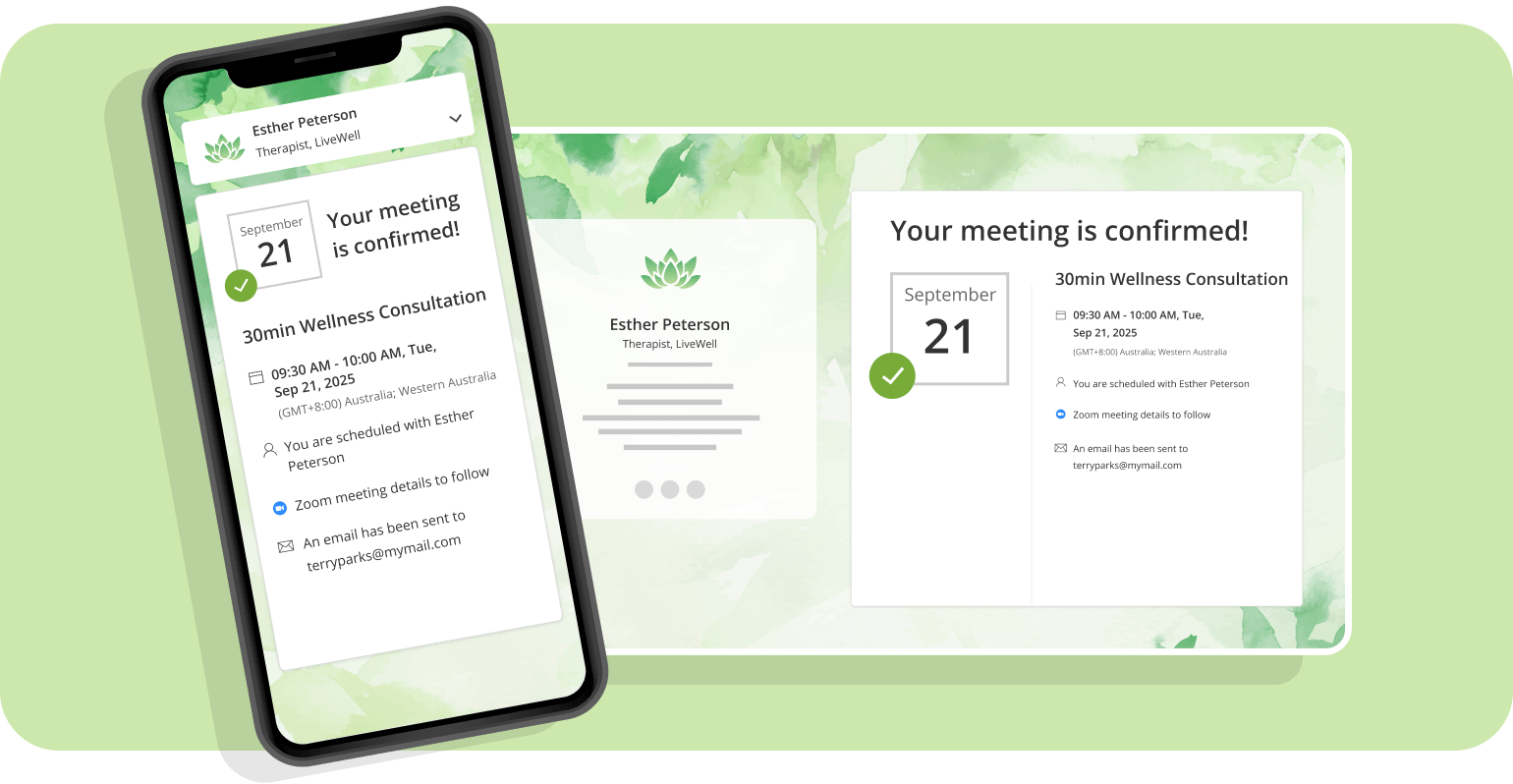
Think of your booking page as the front door to your business. Add a profile picture (preferably smiling), an engaging background image, and simple, friendly messaging focused on what the guest gets by meeting with you. Make the booking funnel intuitive on desktop and mobile, with a call-to-action that stands out in size, shape, and color. End the process with a warm confirmation email.
Build a Trustworthy Booking Page
People need to trust you to book an appointment online, especially for a first-time booking:
- Make sure your scheduling page reflects your brand in voice, tone, and design.
- Be communicative and transparent about yourself, your business, and your meeting offering.
- Add social proof — client logos, testimonials, or reviews.
- Link to your website or LinkedIn so people can verify you're real.
- Add relevant compliance or security badges depending on your industry.
Spread the Word About Your Online Booking Options
- Notify clients directly: mention the option in emails, texts, voice messages, and even fliers with a QR code.
- Highlight the benefits from their perspective: ease of use, 24/7 access, speed.
- Leverage social media: share your scheduling capabilities and address anticipated pushback in advance.
- Add a scheduling link to your email signature.
- Embed your booking link on your website — contact page, pricing page, product pages, homepage.
- Add an eye-catching call to action. A generic “Book Now” works, but a more specific line often converts better. Try alternatives like “Grab a Time,” “Reserve Your Spot,” “See My Availability,” “Talk to Us,” or “Get Started” depending on your tone and audience — the goal is a button that feels like an invitation, not an instruction.
- Implement AI-driven scheduling — add a scheduling chatbot to answer incoming queries on the spot or guide visitors to relevant options.
- Offer exclusive perks for online bookings — better time slots, giveaways, discounts.
- Create an online marketing campaign — sponsored posts, Google ads, native advertising built around your booking link.
- Raise awareness offline — QR codes on merch, presentations, and business cards.
Does Online Booking Work for Every Industry?
Yes — the same core mechanics apply well beyond typical office meetings:
- Rental businesses can let customers reserve equipment, vehicles, or spaces for a specific time window, the same way they'd book a consultation.
- Tour guides and experience providers can offer bookable time slots for tours, sessions, or activities without a phone call.
- Sports facilities and court bookings can use capacity-limited time slots so customers reserve and pay for court time directly.
- Photographers and creative service providers can let clients book shoots directly, with a form collecting shoot details up front.
- Service trades like pest control, cleaning, or home services can let customers self-schedule a visit without calling the office.
The common thread: if a customer needs to reserve a specific window of your time or resources, a booking page can handle it.
Why Aren't My Customers Booking Online Yet?
If you've already set up a booking page and adoption is slower than expected, a few common culprits are usually to blame:
- The link isn't visible enough. If it's buried on one page instead of your email signature, website, and social profiles, people default back to calling.
- The booking form asks too much. Every extra required field is a chance for someone to abandon the process — ask only what you genuinely need before the meeting.
- The page isn't mobile-optimized. With most bookings happening on a phone, a clunky mobile experience quietly kills conversions.
- There's no trust signal. A generic, unbranded page can feel less credible than picking up the phone to a real person — social proof and brand consistency close that gap.
- The call to action is too generic. A plain “Book Now” blends in; a specific, inviting line draws the eye.
- Customers simply don't know it exists. If you haven't actively announced the option across every channel, many customers will default to their old habit of calling.
A Few More Tips to Power Up Your Scheduling Game
Choose the Right Platform
The top five capabilities to look for:
- A WYSIWYG booking page design tool to match your brand.
- Essential integrations — calendar, email, video conferencing, CRM.
- Security and compliance measures that protect your data and your customers' information.
- Routing forms to screen requests and guide people to the right meeting automatically.
- Automated, customizable email/SMS reminders with easy rescheduling and cancellation.
Create Booking Links for Different Use Cases
If you offer a variety of meeting types, create different booking links for each, directing visitors to the right calendar using a routing form or AI chat — and build more targeted marketing materials around each link. If several people need to be coordinated into the same session rather than just one guest booking one slot, group scheduling is worth setting up as its own link type.
Build a Booking Hub
A booking hub presents multiple calendars on one page, letting visitors choose based on meeting length, area of expertise, or the specific person they want to meet with.
Create a Fall-Back Booking Page
If your booking page is embedded on your website, keep an external version too, so you can redirect customers to it automatically if your website ever goes offline.
Redirect After Booking
Set up a redirect that sends visitors to a strategic page — your website, a listing, a social profile — after they complete a booking, to keep building the relationship.
Conclusion and Takeaways
The use of online scheduling systems is on the rise, as are customers' expectations to be able to book online. At least 62% of small to medium businesses in Asia Pacific use digital scheduling solutions, and the numbers in the US market are climbing as well. According to Allied Market Research, the global appointment scheduling software market size is expected to reach $546.31 million by 2026.
The popularity of online booking isn't surprising — it's convenient and efficient for hosts and guests alike. You can start by promoting your new online booking system to existing customers, or run a pilot program to test the system before a full rollout. After launching, monitor customer feedback closely and be prepared to adjust as needed.
By creating an effective booking page and implementing the tips above, your business can increase online bookings, reduce no-shows, save time, and improve customer loyalty. OnceHub can help you get there — sign up for free to get started.
Frequently Asked Questions
What is online scheduling and how does it work?
Online scheduling lets customers self-book appointments through a branded booking page that shows real-time availability. It automatically confirms bookings, sends reminders, and syncs with your calendar — eliminating phone calls and manual coordination.
How do I get customers to book appointments online instead of calling?
Add your booking link to your email signature, website, and social media profiles. Highlight the convenience benefits — 24/7 access, no hold time, instant confirmation — and consider offering exclusive perks like better time slots for online bookings.
What should an online booking page include?
An effective booking page should include your brand visuals, clear meeting descriptions, a booking form for guest information, automated confirmation emails, reminder settings, and easy rescheduling or cancellation options.
How does online scheduling reduce no-shows?
Online scheduling reduces no-shows through automated multi-channel reminders, self-service rescheduling options, and booking forms that increase commitment. Research shows 61% of customers prefer to cancel or reschedule online rather than by phone.
What is the difference between a booking form and a routing form?
A booking form collects guest information before a meeting. A routing form goes further — it asks dynamic questions and automatically directs visitors to the correct calendar or team member based on their answers, saving manual screening time.
What can I say instead of “Book Now” on my booking button?
Alternatives like “Grab a Time,” “Reserve Your Spot,” “See My Availability,” or “Talk to Us” often outperform a generic “Book Now” because they feel more like an invitation than an instruction. The best choice depends on your brand voice and audience — test a couple of options and see what actually converts.
Is online booking a good fit for industries like rentals, tours, or service trades?
Yes. Any business where customers need to reserve a specific window of time or a resource — a rental, a tour slot, a court booking, a service visit — can use the same online booking mechanics as a standard meeting scheduler, often with added features like capacity limits or resource assignment.
Why aren't my customers booking appointments online?
The most common reasons are low visibility (the link isn't shared widely enough), a booking form that asks too much, a page that isn't mobile-friendly, missing trust signals, or a generic call to action that doesn't stand out. Most of these are quick fixes once identified.
What's the difference between online scheduling and phone booking?
Online scheduling lets customers self-book from your live availability at any time, with no hold time and instant confirmation. Phone booking offers more personal, real-time interaction but is limited by business hours, staff availability, and a higher chance of manual error.
How do I encourage my team to use the booking tool instead of taking calls manually?
Make the booking link the default answer whenever a call or email comes in asking for a meeting, add it to internal templates and signatures, and share early data on time saved so the benefit is concrete rather than abstract.
How do I share my booking link via email or on my website?
Add it directly as a hyperlink in your email signature, embed it on key website pages (contact, pricing, homepage), or share it as a plain link in any message — most booking platforms generate a single shareable link that works across all of these without extra setup.